Chapter 21: Introducing DisSModel
Part IV — DisSModel: Core and Paradigms
Learning Objectives
By the end of this chapter you will be able to:
- Explain why DisSModel exists and what problem it solves
- Install DisSModel and its extension packages
- Run two real example models and watch them live, using DisSModel's built-in
ChartandMapcomponents - Know that reproducibility is one of DisSModel's core design goals, with the framework's full answer to it built in Chapter 22
# Standard imports — add chapter-specific imports below
import numpy as np
import pandas as pd
import matplotlib.pyplot as plt
Every technique since Chapter 17 has been building a spatial model largely by hand — a raw NumPy grid, a hand-written neighbor loop, a salabim event queue assembled one piece at a time. This chapter's only job is to get DisSModel installed and make the case that it's worth using: no lifecycle deep-dive, no model construction from scratch, just two of the framework's own example models running live, with real visualization, so there's something worth understanding before Chapter 22 opens the hood.
Why DisSModel
DisSModel is a Python modeling framework, developed by this book's own research group since 2024, that takes its paradigms from TerraME and LuccME. TerraME, built at INPE with TerraLAB/UFOP and written in Lua, and LuccME, its land-use change framework, have backed two decades of spatial modeling research in Brazil and remain the reference DisSModel is checked against (Chapter 30) — but Lua sits outside the Python scientific ecosystem this book has spent twenty chapters building fluency in. Every model written in TerraME had to either stay isolated from pandas, geopandas, and the rest of that world, or be translated by hand.
DisSModel's founding bet is that a modeling framework should live inside that ecosystem rather than beside it. Three principles follow directly from that bet, and reappear throughout Part IV:
- Open — source available, openly licensed, built to be read and extended, not just called.
- Interoperable — a model's state is a
GeoDataFrameor a NumPy-backed raster, the same objects Part II already made fluent, not a framework-specific data type requiring its own import/export step. - Reproducible by construction — not an afterthought bolted on later, but a contract (Chapter 22's
ModelExecutor) that any model can be wrapped in, without changing the model itself, when a run has to be recorded and repeated.
The map below shows that lineage for the whole ecosystem at once: each TerraME piece on the left, its DisSModel counterpart on the right, grouped by role — core, didactic packages, domain models, data preparation, infrastructure — and marked by how mature each one is today. It is an early snapshot: most packages are just getting started, and boundaries and APIs will change as the work progresses.
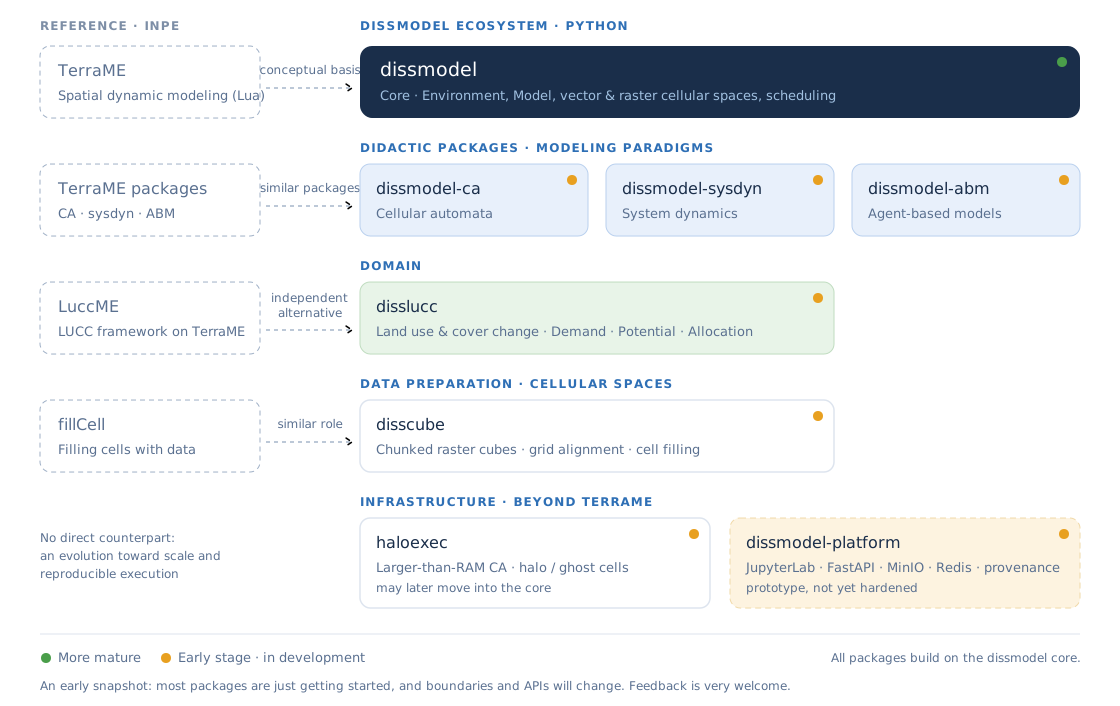
The DisSModel ecosystem and its TerraME counterparts. Also on the project site, dissmodel.github.io.
The map shows packages. Around them sits a second set of repositories that hold evidence rather than code to install: terrame-docker (TerraME and LuccME in a container), luccme-goldens (their reference outputs), disscube-benchmark and disslucc-benchmark (the comparisons against those outputs), and two case repositories, disscube-grids and open-lucc-workflow. Chapters 28 to 31 use all of them.
Chapter 34 returns to this lineage directly, with a concept-by-concept migration guide for anyone bringing an existing TerraME or LuccME model across.
Installation
dissmodel itself is published on PyPI, together with the two packages Volume II uses for land-use work, DisSCube (Chapter 28) and DisSLUCC (Chapter 26):
pip install dissmodel==0.6.6 disscube==0.6.0 disslucc==0.5.0
The paradigm extensions dissmodel-ca and dissmodel-sysdyn — the ones the rest of this chapter runs — are not on PyPI; install the tagged release from GitHub, which is also the version that has a DOI to cite:
pip install "git+https://github.com/DisSModel/dissmodel-ca.git@v0.2.0"
pip install "git+https://github.com/DisSModel/dissmodel-sysdyn.git@v0.2.0"
The book's requirements.txt pins every package at the version the chapters were checked against, and the index lists their DOIs.
If you're working from a local clone of an extension repo instead — to run its bundled examples/, or to modify it — install it in editable mode from inside the repo:
git clone https://github.com/DisSModel/dissmodel-ca.git
cd dissmodel-ca
pip install -e .
Both patterns slot directly into the venv workflow Chapter 5 already established — nothing about DisSModel changes how you'd manage a Python environment. Everything below assumes both packages are already installed.
Watching a Model Run: Chart and Map
DisSModel ships two small visualization components, Chart and Map. Both are just Model subclasses: construct one against the same Environment as the model itself, and it redraws automatically at every tick, with no plotting loop to write by hand.
The two models below are real, pre-built examples from DisSModel's own extension packages: FireModel (dissmodel_ca, a spatial cellular automaton) and SIR (dissmodel_sysdyn, a system-dynamics epidemic model). Neither is explained here — FireModel's spreading rule is Chapter 24's case study, and SIR's equations are Chapter 23's. The point of running them now is simply to see DisSModel do something worth learning more about: whatever a model actually computes, Chart and Map don't need to know anything about it beyond a column name.
from dissmodel.core import Environment
from dissmodel.geo import vector_grid
from dissmodel.visualization import Map
from dissmodel_ca.models import FireModel

grid = vector_grid(dimension=(20, 20), resolution=1, attrs={"state": 0})

env = Environment(end_time=2)
fire = FireModel(gdf=grid, initial_fire_density=0.02)
fire.initialize()
Map(gdf=grid, plot_params={"column": "state", "cmap": "YlOrRd", "legend": True})

env.run()

Map just needed gdf — the same GeoDataFrame FireModel is mutating every tick — and a plot_params dict forwarded straight to GeoDataFrame.plot(), exactly as Chapter 15 used directly. FireModel itself is a CellularAutomaton, a Model subclass with a couple of extra pieces (rule(), a neighborhood); Chapter 24 opens with this identical class and finally explains what rule() is doing.
from dissmodel.visualization import Chart
from dissmodel_sysdyn.models import SIR

env = Environment(end_time=30)
sir = SIR()
Chart(show_legend=True, show_grid=True, title="SIR Model")

env.run()

Chart needed even less — no gdf at all, since SIR isn't spatial. It found susceptible, infected, and recovered automatically, via a @track_plot decorator on the SIR class itself (visible in its source on GitHub, linked below) rather than anything passed to Chart's constructor. Chapter 23 covers SIR and @track_plot both, alongside several more system-dynamics models from the same dissmodel_sysdyn package — PredatorPrey and Daisyworld among them. Chapter 24 does the same for FireModel's neighbors: GameOfLife and a dozen other cellular automata.
Reproducibility, Briefly
Why DisSModel above named reproducibility as one of the framework's founding goals, not an afterthought. ModelExecutor is where that goal becomes a concrete contract — a stricter, four-phase layer (validate → load → run → save) on top of the Model lifecycle Chapter 22 covers in full, built specifically so a model's results stay auditable long after it ran. This chapter doesn't build one; Chapter 22 does, end to end, around a real fire-spread model, and Chapter 29 returns to the provenance side of that same contract in depth.
Exercises
- Install and confirm. Follow Installation above in a fresh virtual environment, then re-run the
SIR+Chartcell and confirm it draws three colored lines. - Change one parameter. Re-run the
FireModelexample withinitial_fire_density=0.15andend_time=4. Without readingFireModel's source, predict in a sentence what should look different — then check. - Swap the visualization, not the model. Re-run the
FireModelexample withMap'scmapchanged to"Greens". Nothing about the simulation itself changes — only describe what changes about how it looks. - Checksums, by hand. Using Python's
hashlib, compute the SHA-256 checksum of a small text file you create. What would change about that checksum if you changed a single character in the file? What does that tell you about what a checksum can and can't prove?
# Your code here
Summary
Key concepts introduced
- Why DisSModel exists: TerraME's and LuccME's paradigms brought into the scientific Python ecosystem, with the original software kept as the reference to check against
- Installing
dissmodel,disscubeanddissluccfrom PyPI and the extensionsdissmodel-ca/dissmodel-sysdynfrom their GitHub releases, within thevenvworkflow Chapter 5 established ChartandMap— ordinaryModelsubclasses that redraw automatically at every tick, demonstrated (not yet explained) against two real example models:FireModel(dissmodel_ca) andSIR(dissmodel_sysdyn)- Reproducibility as one of DisSModel's founding goals, with
ModelExecutor's four-phase contract named as the framework's answer to it, explained in full in Chapter 22
Chapter 22 opens the hood: the Model lifecycle in detail, building a model one hook at a time, and everything reproducibility actually requires.
Further Reading
- DisSModel on GitHub: https://github.com/DisSModel/dissmodel
- dissmodel-ca on GitHub, source for
FireModeland this chapter's other cellular automata: https://github.com/DisSModel/dissmodel-ca - dissmodel-sysdyn on GitHub, source for
SIRand@track_plot: https://github.com/DisSModel/dissmodel-sysdyn - TerraME on GitHub, including the course this book's Part III drew several exercises from: https://github.com/TerraME/terrame
- The dissmodel-book's own account of this same material, for a different framing of the same ideas: https://dissmodel.github.io/dissmodel-book/